
PDF to Excel on iPhone, without uploading the PDF
Short answer
In QuickScan, tap Open a PDF or file and pick the PDF, or share it to QuickScan from Files or another app. Each page is read on your iPhone, the table comes out as rows and columns with unsure cells highlighted, and you export an Excel (.xlsx) or CSV file. Nothing is uploaded, so it suits bank statements, invoices and payslips.
On a computer? Point your iPhone's camera at the code to open QuickScan in the App Store.
3 free exports, then a one-time unlock. No subscription.
Statements, invoices, price lists and reports often reach you as a PDF, and the numbers you need are in a table you can't edit. Copying it on a phone pastes everything into one column. Retyping it is slow and one wrong digit spoils a total. Here's how to get the table into cells on an iPhone, and what to watch for.
How do I convert a PDF to Excel on iPhone?
- From QuickScan: on Home, tap Open a PDF or file, find the PDF in Files and tap Open. You can choose several files at once.
- From another app: in Files, Mail or wherever the PDF is, tap the Share button and choose QuickScan. It opens straight to the table.
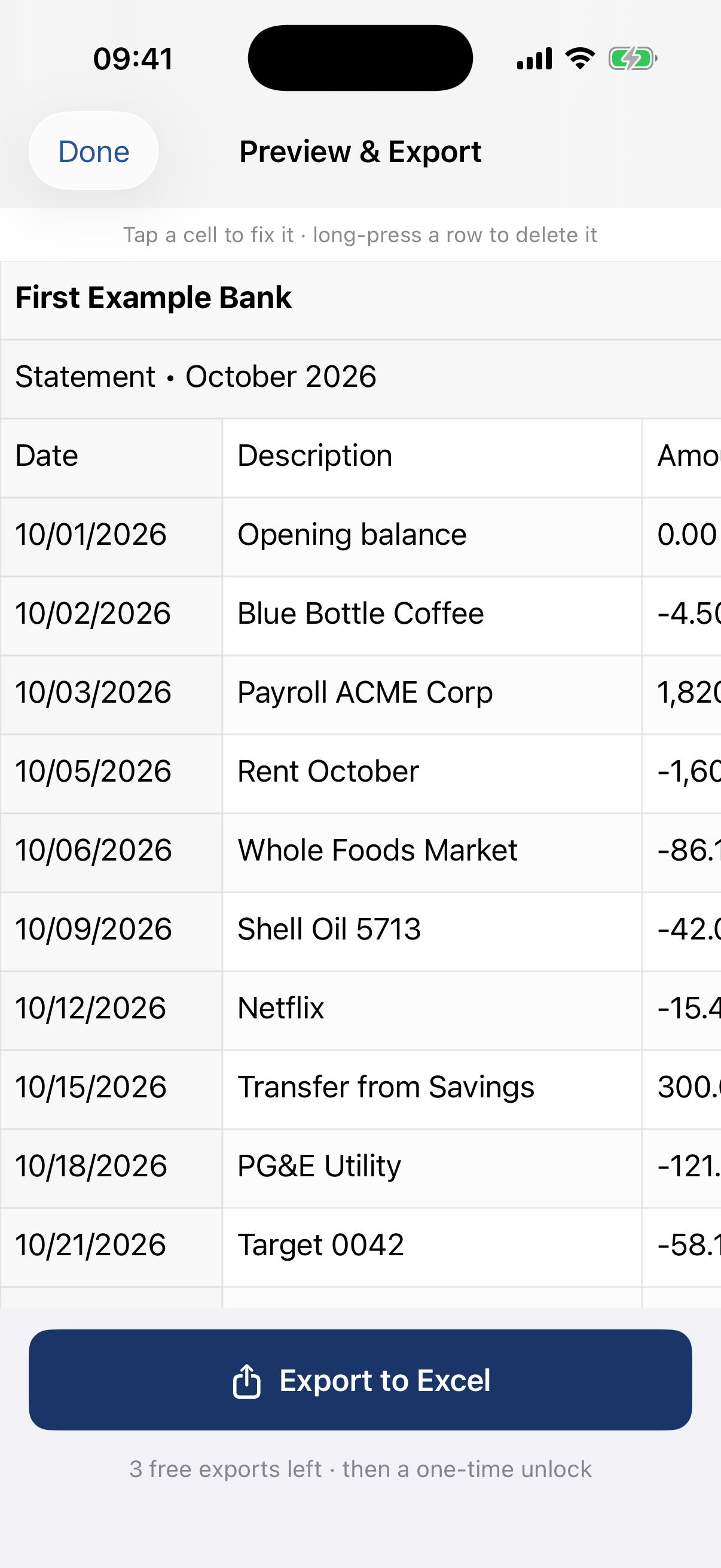
- Check the highlighted cells: they're the ones QuickScan is least sure about. Tap one to fix it; long-press a row you don't need (a page header, a “carried forward” line) to delete it.
- Tap Export and choose Excel (.xlsx) or CSV. Open it in Excel, Numbers, Google Sheets or your accounting tool.
Which PDFs work, and which don't?
| Your PDF | What happens | Tip |
|---|---|---|
| Digital: a statement or invoice downloaded from a website | Reads best: sharp text, straight columns | Ask for a CSV export first if your bank or supplier offers one: it's exact |
| Scanned: a paper page saved as PDF | Read like a photo of the page | A straight, well-lit scan reads better than a skewed one |
| More than 10 pages | The first 10 are read, and QuickScan tells you | Scan the rest separately |
| Needs a password to open | Can't be read; QuickScan says why | Open it with the password and take a screenshot of the table |
| Handwritten | Often misread | Check every cell |
What are the other ways, and where does the PDF go?
- Copy and paste (Live Text, or selecting text in the PDF): free and on the phone, but you get text, not a table: it pastes into one column. The free paste-to-columns tool can split it back for a few rows.
- Online PDF converters: work from any browser, but the PDF is uploaded to the converter's servers. For a bank statement that's your name, account number and every payment.
- ChatGPT or another AI chat: upload the PDF and ask for an Excel file. It often gets a clean table right, but it doesn't tell you which values it's unsure about, and the PDF goes to the AI company's servers.
- PDF converter apps: search results for “PDF to Excel iPhone” are mostly App Store listings. Read each listing for where the conversion happens, and check In-App Purchases for weekly subscriptions.
- On a computer: Excel for Windows with Microsoft 365 can import a PDF's tables (Data › Get Data › From File › From PDF).
The quick test for any of them: switch on Airplane Mode and try it. If it still converts the PDF, the PDF never left your phone. QuickScan passes it.
Check the numbers before you use them
Any reading step can get a digit wrong, so let the document check itself. On a statement, opening balance + credits − debits should equal the closing balance; on an invoice, the lines should add up to the subtotal. The details are in bank statements to Excel and invoice line items to Excel. In QuickScan's Excel file, plain amounts are stored as numbers, so the sums work straight away.
What QuickScan is, and what it costs
QuickScan is a table scanner for iPhone and iPad, and it's ours. It reads photos, screenshots and PDFs on the device, with no account and no server. You get 3 free exports at full quality, then a one-time unlock, with no subscription. It reads tables, not labelled fields: it won't pull an invoice number or due date into its own column.
On a computer? Point your iPhone's camera at the code to open QuickScan in the App Store.
3 free exports, then a one-time unlock. No subscription.
On a computer? Point your iPhone's camera at the code to open QuickScan in the App Store.
3 free exports, then a one-time unlock. No subscription.
Questions
Is the PDF uploaded anywhere?
No. QuickScan reads the PDF on your iPhone: there's no account and no server, and it works in Airplane Mode. A PDF you share to QuickScan from another app is deleted from QuickScan once it's read; the original stays where it was.
Does it work with scanned PDFs?
Yes. A scan saved as PDF is a picture of the page, and QuickScan reads it the way it reads a photo. A clean digital PDF (one you can select text in) reads best of all.
How many pages can I convert at once?
Up to 10 pages per scan. Each page becomes its own sheet in the Excel file. For a longer PDF, QuickScan tells you how many pages it read; scan the rest separately.
What about password-protected PDFs?
A PDF that asks for a password to open can't be read. QuickScan says so and goes back to Home. Open it with the password in Files or Mail and take a screenshot of the table instead. PDFs that only restrict printing or copying open normally.
Can I convert a PDF to Excel without an app?
On an iPhone, not with the built-in apps: Files and Preview show a PDF, and Live Text copies its text, but a table pastes into one column. Online converters and AI chats can do it, but they upload the PDF to their servers.